Canvas guide · 7 min read
Floating frame mockup tips: how to make floater frames look right
Short answer: Get the gap right first: a thin, even, usually dark reveal between canvas and frame, sized to your supplier's number (Prodigi lists a 5 mm gap and 12 mm face, Gelato a 12 mm gap, checked 2026-10-29). Then match the finish you ship, keep the frame face slim, let a soft shadow show the depth, and show no glass, no mat and nothing covering the front of the canvas.
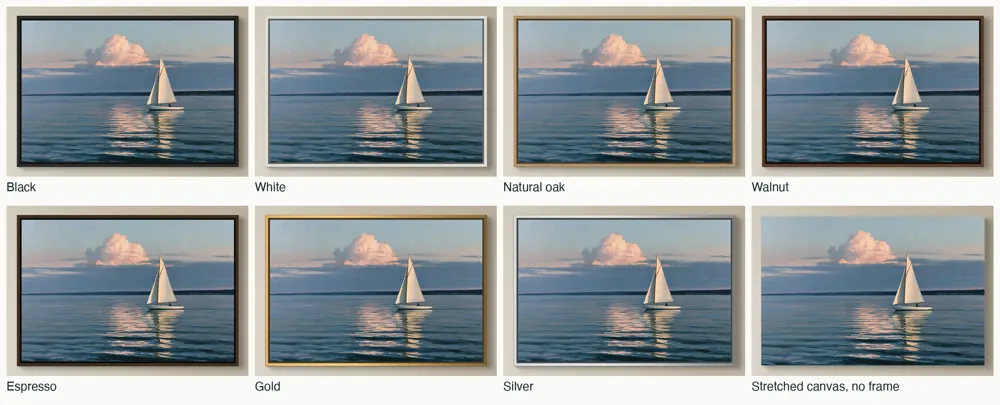
The gap is the detail that makes a floater read as framed canvas at all, and it is the one buyers notice when it is wrong. This is the how-to, with numbers you can check against your own supplier. To have the images made for you, the floating frame canvas mockup generator draws the gap in 8 frame colours, and the canvas print mockup generator covers stretched canvas too.

The five details buyers read in a floating frame
A floating frame, also called a floater frame, holds a stretched canvas from behind, so nothing covers the front of the canvas. Buyers recognise it from five details, and each one has to match the product you ship:
- The gap. A thin, even reveal between the canvas edge and the inside of the frame, on all four sides.
- The colour inside the gap. Usually dark: you are looking at the inner wall of the frame and its shadow, not the wall behind.
- A slim frame face. The front border of a floater is narrow, about 9 to 14 mm at the providers below.
- Depth and shadow. The frame stands off the wall, so it casts a soft shadow that agrees with the room's light.
- The finish you ship. Black, white, wood or metal, matching the variant the buyer orders.
What is missing matters as much: no glass, no reflections, no mat and no frame lip over the art. If you are not sure how a floater differs from other frames, read what is a floater frame first.
From my shop: why the gap matters
Buyers in my shop have questioned whether a frame matched the listing image. A narrow floating-frame gap, a different wood tone or a mat that is too wide each changes the product a buyer thinks they are buying. On a floater the gap matters most, because it is the detail that says "framed canvas" rather than "framed print". More recent buyers have said the piece matches the website or looks better in person, which is the test every listing photo should pass.
Two habits follow. Before listing a frame you have not checked, order a sample: a digital frame colour is an approximation. And put a frame close-up card second in the listing, straight after the hero room photo, so the gap and finish are visible up close before the buyer scrolls through more rooms.
Get the gap width right, in millimetres and pixels
The gap is a fixed physical size, so how wide it looks in your image depends on how big the canvas is. Here is what three print-on-demand providers state on their own pages (checked 2026-10-29):
| Provider | Gap | Frame face | Depth |
|---|---|---|---|
| Prodigi framed canvas | 5 mm | 12 mm | 53 mm from the wall, with a 38 mm canvas |
| Gelato framed canvas | 12 mm | 9 to 14 mm | 42 mm frame in North America, 32 mm in Europe |
| Printful framed canvas | Not stated; it says the frame gives a "floating effect" | Not stated | Frame 1.25 in (3.18 cm) thick |
Sources: Prodigi framed canvas, Gelato canvas and framed canvas, Printful framed canvas.
To turn millimetres into pixels, divide the canvas width in pixels by its width in millimetres, then multiply by the gap. A worked example: a 24 × 36 in canvas is 610 mm wide. If it appears 600 px wide in your mockup, that is about 1 px per mm, so a 5 mm gap is about 5 px and a 12 mm face about 12 px. Now show a 12 × 16 in canvas (305 mm wide) at the same 600 px. Every millimetre becomes about 2 px, and the same 5 mm gap is about 10 px.
Two rules follow. At the same front-on pixel width, a fixed physical gap looks thinner on a bigger canvas, so one gap width for every size is wrong. And keep the physical gap even all the way round; only perspective in an angled scene should make one side look narrower than another.
Show depth with the shadow, not a thicker frame
From the front you can't see how deep a floater is. Buyers judge depth from the shadow it casts and, in a close-up, from the side of the frame. Prodigi's framed canvas stands 53 mm off the wall; Gelato's frame is 42 mm deep in North America and 32 mm in Europe (checked 2026-10-29). Under the same light, a deeper frame throws a slightly wider shadow.
- Put the shadow on the side away from the room's main light. If the window is on the left, the shadow falls to the right and below.
- Keep it soft and short. A hard black outline looks pasted on.
- Don't widen the frame face to suggest depth. A chunky front border reads as a different, heavier frame.
- If you list the frame depth, give inches and millimetres, and use your provider's number for the region it ships from.
Match the frame colour your provider ships
Providers name their finishes differently, so map them before you make photos. The colours below are from each provider's own page (checked 2026-10-29), with the closest WallMock finish.
| Provider | Framed canvas colours it lists | Closest WallMock finishes |
|---|---|---|
| Prodigi | Black, white, antique gold, antique silver, natural, brown | Black, white, gold, silver, natural oak, walnut or espresso |
| Gelato | Black, natural wood, dark brown | Black, natural wood or natural oak, espresso or walnut |
| Printful | Black, brown, white | Black, walnut or espresso, white |
One detail from Printful's product description: its brown and black framed canvases have a black inside around the canvas, and its white frames have a white inside. So the gap reads dark on black and brown frames and light on white ones. Check your own sample, because a dark gap on a white frame that ships with a white inside would not match. For one artwork in every finish, side by side, see which frame colour to show.
Seven mistakes that make floater mockups look fake
- The canvas touches the frame. With no gap, it reads as a framed print.
- A mat or glass inside a floater. Floating frames for canvas have neither.
- A frame lip over the art. In a floater the whole front of the canvas shows; none of your artwork should be cut off.
- One gap width for every size. Use the pixel rule above.
- The shadow on the wrong side, or the same hard shadow in every room.
- Art stretched or cropped to fit a template. A 2:3 canvas must stay 2:3. The canvas print sizes chart groups sizes by ratio.
- A frame colour or depth you don't sell. That is a return waiting to happen.
Check it at two sizes
Look at every photo twice. I check every listing image this way before upload, and nothing with a known defect goes up. At thumbnail size, about as wide as a search result on a phone, the frame colour should be clear and the gap should show as one thin line. At 100% zoom, check one corner: the gap should run straight into the corner, the frame should meet in a clean mitre (the angled corner joint), and the canvas edge should be crisp. Check the artwork's own corners, edges and signature while you are there.
Then compare against a photo of your sample, if you have ordered one. Etsy's image rules say all images must accurately reflect the item's true appearance, including colour, scale and materials (Etsy Help, checked 2026-10-29). A floater mockup that shows a different gap, finish or depth breaks that rule as surely as a wrong colour.
What WallMock can match, and what to compare with a sample
A mockup can get the look right; only a sample proves the product. Premium proportions is the default visual setting. Use Frame width and Floating gap in Profiles on Lite or Pro to adjust the look. That does not certify a supplier’s exact gap or depth. A 12 mm face and a 12 mm gap are different measurements; selecting one does not establish the other.
Frame colours are visual approximations. Compare the sample’s inner colour, grain and sheen as well as its front colour. Use a real corner photo to show construction details the room view cannot prove. Our testing page explains that difference between a render check and a physical product comparison.
Making floating frame mockups in WallMock
- Upload your art file, or a whole collection.
- Heart the rooms you sell in, from 500+ curated rooms.
- Choose Canvas, then the floating frame and its colour: black, white, natural oak, natural wood, walnut, espresso, gold or silver. On Lite or Pro, save up to five custom frame colours and reuse them in product profiles.
- Free accounts include 50 watermark-free previews every 30 days. On desktop, quick room previews are unlimited in your included rooms. Try Free without an account offers watermarked previews. Paid plans have unlimited previews. Free accounts include 10 clean 4K (4096 px) single-artwork downloads every 30 days in their included rooms; paid plans add more images.
WallMock draws the gap between canvas and frame in every finish, so the photo shows framed canvas, not a framed print. It places your file as it is, never redrawn or upscaled, and downloads are 4,096 px on the long edge.
Read next: matching your POD supplier’s floating frame, what a floater frame is, frame colours compared and canvas depth.
Sources
- Prodigi: Framed canvas (gap, face, depth, colours), checked 2026-10-29
- Gelato Support: Start selling canvas and framed canvas (gap, frame depth and width), checked 2026-10-29
- Gelato Support: FAQs framed canvas (colours, sizes), checked 2026-10-29
- Printful: Framed canvas (frame thickness, colours, inside colour), checked 2026-10-29
- Etsy Help: Requirements and best practices for images, checked 2026-10-29