Etsy seller guide
How to sell wall art on Etsy: products, photos and mockups
Short answer: To sell wall art on Etsy, decide whether you sell printables or physical prints. For prints, make them yourself or use a print provider you list as a production partner. Then build listings with up to 20 photos. Etsy needs images that show exactly what buyers receive, and usually at least one unedited photo of the real item. Add room mockups that match your frame and size, and disclose AI if you used it to make the art.

1. Choose what you'll sell
Etsy groups items by how they're made. Your own designs, sold as digital downloads or printed by a third party, fall under "Designed by a seller" (Etsy). For wall art that means three common models:
| Model | What the buyer gets | What to check |
|---|---|---|
| Printable (digital download) | Files they print themselves | Ratios and sizes included; previews of the real files. See mockups for printable wall art |
| Print on demand | A framed canvas, framed print or poster made and shipped by a partner | Production partner listed; sample ordered; mockups match the partner's frames. See how to choose a provider |
| You print and ship | Prints you make or have made locally | Your own photos of the real item; packaging and shipping |
For physical prints, also choose the format. A framed canvas, a stretched canvas, a framed print with a mat and an unframed poster are four different products with different photos. Canvas vs framed print mockups explains how to show each one.
2. Set up your production partner
If a print-on-demand company prints your work, Etsy requires you to disclose it on the listings (Etsy). Etsy's own examples of print-on-demand partners include Printful, Printify and Gooten. The steps on Etsy.com:
- Shop Manager → Settings → Partners you work with.
- Add a new production partner: enter the partner's name and location. You can show a descriptive title instead of the name.
- Describe how you work with them, then save.
- Choose the partner on each listing, or in bulk with Listings → Editing options → Change production partners.
Etsy also asks you to set shipping locations to match where the partner ships from.
3. Know Etsy's photo rules before you make mockups
Etsy's listing image rules (checked 2026-10-26). The key points from Etsy's help page and image requirements:
- All images must show the item's true colour, condition, scale and materials.
- Most listings need at least one unedited photo of the actual item against a real background. Some item types have exceptions. For print-on-demand items, Etsy describes using an authorised stock photo mockup. Read the Listing Image Requirements policy for your product.
- Other photos can be edited, including with AI, to change lighting, crop or background, as long as the item doesn't look different.
- Make the first photo the clearest, most realistic view of what buyers get.
The technical side:
| Rule | Etsy's guidance |
|---|---|
| Photos per listing | Up to 20 photos and 2 videos of 5–15 seconds (source) |
| Size | At least 2000 px in width and height recommended; first photo at least 635 px (source) |
| First photo shape | Horizontal (landscape) or square, so the thumbnail crops well |
| File types | .jpg, .gif, .png, .svg or .heic; no animated GIFs; transparent areas show as black |
| Colour | Convert to sRGB if colours look wrong |
| Thumbnail | Your first photo; reorder by dragging in the listing editor (source) |
For framed canvas and posters, the simplest way to meet the unedited-photo rule is to order a sample and photograph it in daylight. Then use room mockups for the other slots.
4. Plan the photos: a sample, then rooms
A wall art listing has to answer three questions: what does it look like at home, how big is it, and what exactly arrives? A practical order:
- Hero room: your best room mockup, art clearly the focus. If Etsy's rules make your unedited photo the clearest view, put that first.
- Scale: the art above a sofa, bed or sideboard, at the size you sell.
- Sample photo: the real print, frame corner or canvas edge.
- Other rooms: bedroom, living room, office or nursery, so different buyers see their home.
- Options: frame colours, sizes and sets, one clear image each.
The full 20-slot version is in Etsy listing photos for wall art, and the how-to is in how to make wall art mockups for Etsy. For size photos, use the art size over a sofa tool.
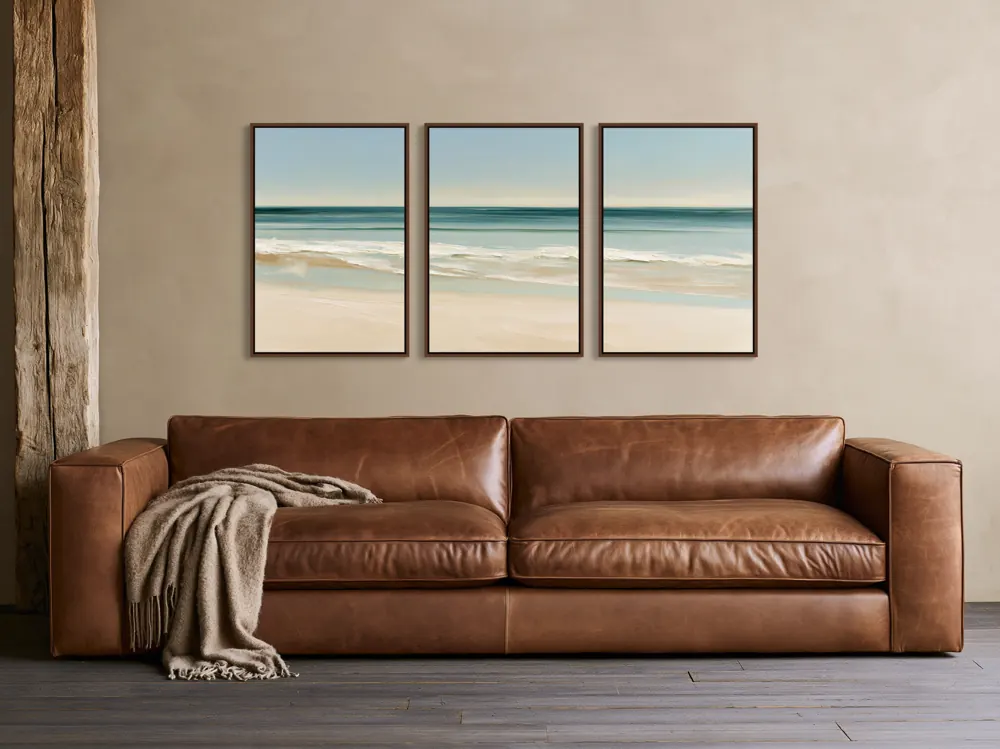
5. Mockups that match the print
A mockup is only useful if the buyer receives what it shows. Check each image against this list before you upload:
- Same product: framed canvas, stretched canvas, framed print or poster.
- Same frame colour and mat as the variant.
- Same artwork ratio, not cropped or stretched to fit the room.
- Believable size for the size you sell.
- Artwork untouched: text, signature and colours exactly as printed.
- At least 2000 px, sRGB, no transparency.
Check that your file can print at your largest size with the print resolution checker.
6. If AI was part of making the art
Etsy allows AI-assisted art when the seller plays a clear creative role, and requires you to disclose AI use in the listing description (Etsy). That rule is about the artwork you sell. Editing your other listing photos is covered by the photo rules above. Our guide to selling AI art prints on Etsy covers disclosure and print quality. AI mockup generators explains why your mockup tool shouldn't redraw the art.
Where WallMock fits
WallMock makes the room photos for the listing. Upload the artwork you sell and choose the product: framed canvas (floating frame), stretched canvas, framed print, with or without a mat, poster and print without a frame. WallMock places your file as it is: it is never redrawn, repainted or upscaled by AI. Save favourite rooms once and add a whole collection, so every design gets the same set of rooms. Sets of 2, 3 or 4 work too.
Free watermarked previews in every room. Rooms are curated, digitally staged interiors reviewed by WallMock. Anyone can try free watermarked previews. Full access is by invitation during the beta: request one, then sign in with your invited email.
Sources
- Etsy Help: What can I sell on Etsy?, checked 2026-10-26
- Etsy Help: Working with production partners, checked 2026-10-26
- Etsy Help: How listing image requirements apply to your listings, checked 2026-10-26
- Etsy: Listing Image Requirements policy, checked 2026-10-26
- Etsy Help: Requirements and best practices for images, checked 2026-10-26
- Etsy Help: How to create a listing, checked 2026-10-26
- Etsy Help: How to edit your listing photos, checked 2026-10-26